
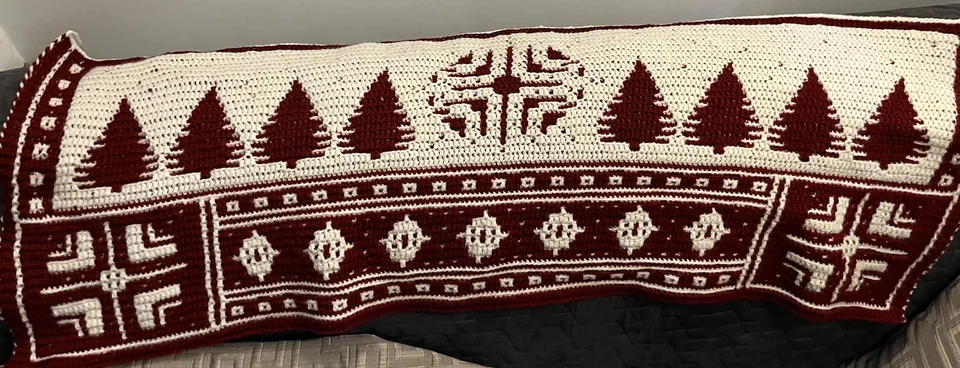

About This Generator
The Mosaic Crochet Generator demonstrates a constrained two-color overlay construction. It is useful for studying how a long drop stitch can cover a previous color row while each working row uses only one yarn color. It is not an arbitrary image-to-mosaic converter. Begin here after learning back-loop single crochet and locating an unused front loop below the current row. For unrestricted colored pixel artwork, Tapestry or C2C is the more appropriate tool family.
How to Use This Generator
Chart columns sets the number of stitch positions across each working row, and Chart rows sets the number of working rows. The current page exposes these dimensions and the color swatches; it does not expose a freehand mosaic-cell editor. Choose the four-row baseline or one of ten original named logical masks. Named masks need at least seven columns and an odd count of eleven or more working rows. Each logical motif row occupies a B/A pair after the initial A row;the live form displays the actual working-row count. Only the first two swatches participate in mosaic construction. Extra swatches in the shared color controls do not introduce additional working colors into this algorithm.
Choose US or UK terminology, regenerate, and start with Written Pattern rather than reading the final colored image as ordinary one-stitch colorwork. Compare Symbol Chart's visible surface with Stitch Preview's working-color rows and long anchors. Save project keeps your local settings. Export JSON records the parameters for restoration, while Export SVG provides a vector execution chart. Print lets you mark completed color rows or choose a PDF destination. Retain the two yarn identities when changing swatches so that a color study remains understandable.
Understanding the Crochet Pattern
The supported method works every row from right to left, cuts yarn at the row end, and does not turn the fabric between rows. Ordinary interior stitches use the back loop, leaving the front loop available for a later overlay. A drop dc enters the unused front loop two rows below and replaces the ordinary stitch behind it; it is not an extra stitch added alongside that position. In UK terminology these operations are dc and tr respectively. Both edge positions remain ordinary sc in US terms.
How the Generator Works
The code assigns alternating working colors by row parity. The baseline permits drops only on its four-row repeat. Named designs permit A-color drops on each eligible A row after the preparation pair,while B rows remain back-loop sc. Neither mode drops at either edge. The original logical mask determines eligible interior columns. An A-color front-loop anchor can be an sc or an earlier dc,with the intervening B row using its back loop. Every front loop is used once. The visible ground retains A-colored horizontal rows;this is not an arbitrary solid-color tapestry image. A drop changes the final visible color over the preceding row while retaining the row's output width. Arbitrary imported grids are rejected if they disagree with this supported visible pattern. This prevents a decorative colored picture from being accepted as a mechanically valid overlay instruction sequence.
Step-by-Step Worked Example
Select Four-row baseline. Set Chart columns to 12 and Chart rows to 4, with two strongly distinguishable yarn colors in the first two slots. Chain thirteen in the first working color and work twelve sc from the second chain. The second row uses the alternate color and the plain preparation operations. The third row can include the supported masked drops into the first row's unused front loops. The fourth row follows its listed ordinary operations. Every row still has twelve output positions, so the four-row study contains 48 worked positions. Follow the actual drop symbols: the number twelve does not authorize a drop in every column.
Download this worked example as JSON. Restore it in this generator to compare the actual counts and structure.
Practical Tips
Use a light and a dark yarn of similar thickness for an initial sample. Keep the front of the fabric facing you when attaching each new row. Make drop stitches long enough to reach their anchors without pulling the fabric upward. Leave secure weaving tails at row ends and include those tails when measuring consumption. Inspect the back as well as the front before judging tension or planning a large repeat.
Common Mistakes and Solutions
The design reverses every second row
The work may have been turned as for ordinary rows. Check that every generated row travels right to left, return to the last correctly oriented row, and attach the next yarn at the stated starting edge.
The row gains stitches near each drop
A normal stitch may have been worked behind the drop as well. Count the twelve output positions, locate the duplicated position, and replace that pair with the single planned overlay operation.
The fabric contracts under long stitches
The drops may be too short or anchored one row too high. Identify the unused front loop two rows below, compare its row number with the structure preview, and remake the affected drops without tightening their vertical reach.
Second Reproducible Application
Use this comparison to check how one input changes the mosaic crochet pattern generator output. Enter width = 13; height = 4. Keep any grid and color data from the downloadable worked example unchanged. Generate again and compare the result with the first example above. The resulting dimensions are 13 stitches × 4 rows. These depend on the entered block size, not a measured finished sample. This comparison was executed with the site's engine; it is a numerical construction check rather than a claim about physical gauge. Save both settings separately if you want to compare them later.
Related Tools and Guides
The Tools directory at /generators/ lists the available generators. Use the linked examples on this page to study the same construction with different inputs, and the Guides directory at /guides/ for supporting reading. Check terminology and measured gauge before combining output from different tools.
Frequently Asked Questions
Can I upload a portrait and obtain valid overlay mosaic instructions?
Not through this tool. Its supported repeat has limited drop positions. Use Pixel-to-Crochet for a color grid, then choose a construction that can work that grid rather than assuming it is valid overlay mosaic.
Do all displayed swatches become working colors?
No. The overlay engine uses the first two. Keep the color-slot ordering clear because row parity selects between those two yarns.
Are the row directions alternating?
No. This supported cut-yarn method works each row from right to left. A general alternating-row crochet habit would change the construction.
Why does the visible chart differ from a working-color row?
A long stitch can cover the color immediately below it. The surface view records what remains visible, while the structural view explains the row where the covering stitch is actually worked.
Are the charts proof that a full blanket has been tested?
No. They represent the calculated supported operations. Make a small finished sample and evaluate tension, tails, and repeat appearance before scaling up.