
About This Generator
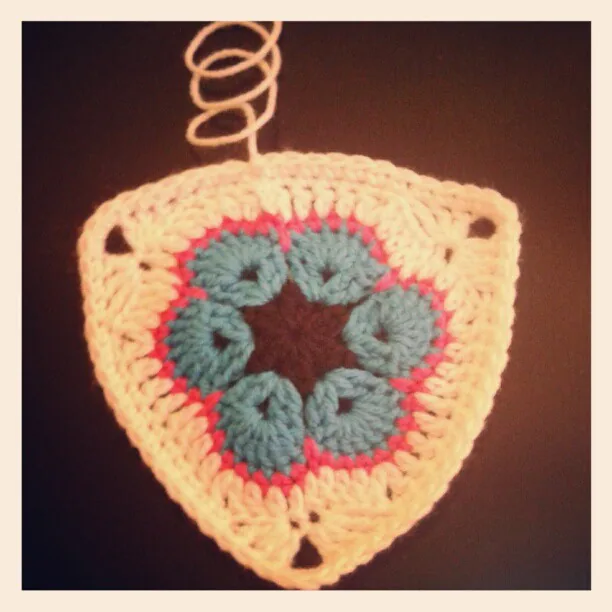
The Triangle Motif Generator supports two different ideas that should not be confused: a flat wedge grown in alternating rows and a center-out motif with three corners. It helps you inspect where growth happens and how a selected edge finish or sewing arrangement connects completed pieces. Use the wedge for a directional shaping study; use a center-out option for a modular triangular motif. It does not convert every possible triangle into the same universal increase formula.
How to Use This Generator
Triangle construction selects Flat wedge, Solid center-out, Three openwork center arches, or Six cluster petals into three corners. Wedge rows or center-out frame rounds controls the growth appropriate to that selection. Final edge can add a supported sc finish to a center-out triangle. Sew completed triangles offers a single motif, a pair with a reversed facing edge, or four alternating motifs in a strip where the selected construction supports it. Wedge mode does not use the center-out finish and sewing settings; combinations disabled by the interface are not hidden capabilities.
Choose the swatches and terminology before generating. In Written Pattern, confirm whether the headings say Row or Round. Use Symbol Chart to identify the two growing edges of the wedge or the three corner spaces of a center-out motif. Export JSON preserves the construction, finish, and layout choices. Save project stores a browser-local copy. Export SVG and Print retain a legible reference; the browser's print destination can create a PDF for annotation.
Understanding the Crochet Pattern
A wedge turns at the end of each row. Its left and right edge operations are read in working order, so the side receiving the final group alternates physically when the work turns. A center-out triangle instead travels around three corners and joins its rounds as instructed. Those corners can contain several stitches and an opening in a shared source. A border is another pass around the completed edge, not an excuse to replace an uneven increase sequence with arbitrary extra stitches.
How the Generator Works
The default wedge starts with three dc worked into the fourth chain from the hook. Every later row adds three actual stitches: two dc replace the first old stitch, the middle stitches are worked individually, and three dc replace the final old stitch. The first substitution adds one and the last adds two. Center-out modes build explicit group and opening records around three corners instead. Their frame, optional finish, and supported sewing pairings are checked separately. The code rejects unsupported combinations rather than inventing an attachment for the wedge.
Step-by-Step Worked Example
Choose Flat wedge and 5 rows, without an extra finish or layout. Chain four and work three dc into the fourth chain. The starting chain-three does not count as an additional dc. Row 2 uses a non-counted chain-two and produces six dc. The next rows contain nine, twelve, and fifteen dc. On the fifth row, two dc in the first stitch, ten ordinary middle dc, and three dc in the last stitch account for all fifteen outputs from twelve old stitches. This example produces a wedge, not an equilateral center-out triangle.
Download this worked example as JSON. Restore it in this generator to compare the actual counts and structure.
Practical Tips
Place different-colored markers in the first and last actual stitches to make asymmetric edge groups easier to remember. Check the row count before measuring a wedge's slope. For a joined center-out set, compare all three blocked side lengths and photograph the arrangement before sewing. Use the actual receiving loops named by the finish; an opening and a post top are not interchangeable. Test a small seam before planning a large tessellated project.
Common Mistakes and Solutions
The wedge grows by only two stitches
The final old stitch may have received two dc instead of three. Count the old row, inspect both edge groups, and remake the row with the different first and last increase groups. Keep the turning chain outside the total.
A center-out motif is being turned like a wedge
The wrong construction may have been assumed from the tool's name. Check the selector and the Row or Round heading, then return to the last correctly joined round before continuing along its circular route.
A sewn strip has reversed outer corners
Some motifs must alternate orientation. Lay out the complete strip, mark corresponding edge ends, and follow the provided pairing instead of sewing every piece in an identical rotation.
Second Reproducible Application
Use this comparison to check how one input changes the crochet triangle motif generator output. Enter rounds = 6; triangleMode = wedge; triangleFinish = none; triangleLayout = none. Keep any grid and color data from the downloadable worked example unchanged. Generate again and compare the result with the first example above. The resulting dimensions are 6 rows; widest row 18 stitches. These depend on the entered block size, not a measured finished sample. This comparison was executed with the site's engine; it is a numerical construction check rather than a claim about physical gauge. Save both settings separately if you want to compare them later.
Related Tools and Guides
The Tools directory at /generators/ lists the available generators. Use the linked examples on this page to study the same construction with different inputs, and the Guides directory at /guides/ for supporting reading. Check terminology and measured gauge before combining output from different tools.
Frequently Asked Questions
Does every triangle use Row headings?
No. Flat wedge uses rows and turns. The center-out constructions use working rounds around three corners, so their round labels are intentional.
Does five mean five total operations for every construction?
The control describes wedge rows or the chosen center-out framing stage. Read the resulting numbered sequence because decorative centers can introduce their own preparation rounds.
Can I add the sc finish to a wedge?
The current optional finish is defined for supported center-out edges. The wedge does not expose that finish; designing a separate wedge edging needs additional edge-pickup decisions.
Will this calculate a triangle's physical angle?
The engine calculates discrete stitch structure. Stitch height, tension, fiber, and blocking affect the physical slope, so an angle or equal side length requires a finished sample.
Why do three added stitches not mean one at each corner?
That interpretation belongs to a different geometry. The flat wedge adds one at its first edge operation and two at its final edge operation, with no third corner traveled during the row.